
一直在关注, vuejs这东西。 只是一直没有成形的应用。 在自已的dwz项目上有个别dialog页面上引入用了一下, 感受了一下数据推动的好处。 但是要完整应用, 始终不会。 最近有一个项目,是系统的一分支, 想多用这个技术。所以就想着看传统引入的方式, 路同, 组件这些在传统方式下怎么应用。
1. 简单的还是实现了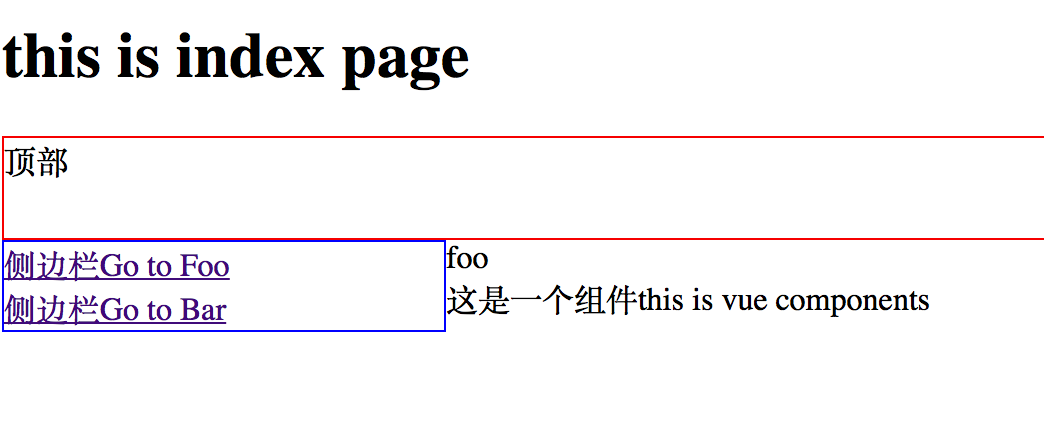 2. 所需要的vuejs css 都从网上download下来了。
index.html页面: ( 注意改一下里面的 vuejs引入相关的文件修改)
<!DOCTYPE html PUBLIC "-//W3C//DTD XHTML 1.0 Transitional//EN" "http://www.w3.org/TR/xhtml1/DTD/xhtml1-transitional.dtd">
<html xmlns="http://www.w3.org/1999/xhtml">
<head>
<meta http-equiv="Content-Type" content="text/html; charset=utf-8" />
<meta http-equiv="X-UA-Compatible" content="IE=edge" />
<meta name="robots" content="nofollow" />
<meta name="robots" content="noarchive" />
<title>{:C('COPYRIGHT')}</title>
<!-- 引入样式 -->
<link rel="stylesheet" href="__PUBLIC__/element-ui/index.css">
</head>
<body scroll="no">

 	<h1>this is index page</h1>
	<div id="app">

  		<router-view name="top"></router-view>
 		<router-view name="left"></router-view>
 		<router-view name="main"></router-view>
 		<test :param='this.param'></test>
    </div>

</body>
<!-- 先引入 Vue -->

<script src="__PUBLIC__/element-ui/vue.js"></script>
<include file="test" />
<script src="__PUBLIC__/element-ui/vue-router.js"></script>
<!-- 引入组件库 -->
<script src="__PUBLIC__/element-ui/index.js"></script>
<include file="test" paramsss="eagle"  title="ThinkPHP框架" keywords="开源WEB开发框架"/>
<script>

    var topCom = Vue.extend({
        template: '<div id="top">顶部</div>'
    })

    var leftCom = Vue.extend({
        template: '<div  id="left">
        	<router-link to="/foo">侧边栏Go to Foo</router-link><br />
			<router-link to="/bar">侧边栏Go to Bar</router-link>
        </div>'
    })

    var foo=Vue.extend({
	    template:'<div>foo</div>'
    })

	var bar=Vue.extend({
	    template:'<div>bar</div>'
    })

    var mainCom = Vue.extend({
        template: '<div  id="main">主页 </div>'
    })

    var router = new VueRouter({
        routes:[
	        {
                path: '/',
                name: 'home',
                components:{
                    top: topCom,
                    left: leftCom,
                    main: mainCom
                }
            },
             {
                path: '/foo',
                name: 'foo',
                components:{
                    top: topCom,
                    left: leftCom,
                    main: foo

                  }

			},{
                path: '/bar',
                name: 'bar',
                components:{
                    top: topCom,
                    left: leftCom,
                    main: bar

                 }

			}
        ]
    })

    var app = new Vue({
        el: '#app',
        data:{
	      param: "this is vue components",
        },
        router
    })
</script>

<style>
	#top{height:50px; border:1px solid red; }
	#left{width:220px; height:"100%"; border:1px solid blue; float:left;}
	#main{float:left;height:"100%";width:"1000px;";border:1px solid gray;}
</style>
</html>
3. test.html 封装组件页面写法
<template id="test">
    <div>{{this.name}} </div>
</template>
<script>
    Vue.component('test', {
        template: '#test',
         props: ['param'],
         data:function(){
            return{
                name:'这是一个组件'+this.param +"[paramsss] " + "[title]" + "[keywords]",
            }
        }
    })
</script>
4. 组件引用,用的是thinkphp <include file=”test” /> 这个一定要放到vuejs引入后面,才能生效